

Availability
Tyk AI Studio provides a Budget Control system to help organizations manage and limit spending on Large Language Model (LLM) usage.
Purpose
The primary goals of the Budget Control system are:- Prevent Overspending: Set hard limits on costs associated with LLM API calls.
- Cost Allocation: Track and enforce spending limits at different granularities (e.g., per organization, per specific LLM configuration).
- Predictability: Provide better predictability for monthly AI operational costs.
Scope & Configuration
Budgets are typically configured by administrators and applied at specific levels:- Organization Level: A global budget limit for all LLM usage within the organization.
- LLM Configuration Level: A specific budget limit tied to a particular LLM setup (e.g., a dedicated budget for a high-cost
gpt-4configuration). - App Level: A budget limit for one App.
- Team Level: A budget for all the Apps of a Team. Refer to Team Budgets.
- Limit Amount: The maximum monetary value allowed (e.g., $500).
- Currency: The currency the budget is defined in (e.g., USD).
- Time Period: The reset interval for the budget, typically monthly (e.g., resets on the 1st of each month).
- Scope: Which entity the budget applies to (Organization, specific LLM Configuration ID, etc.).
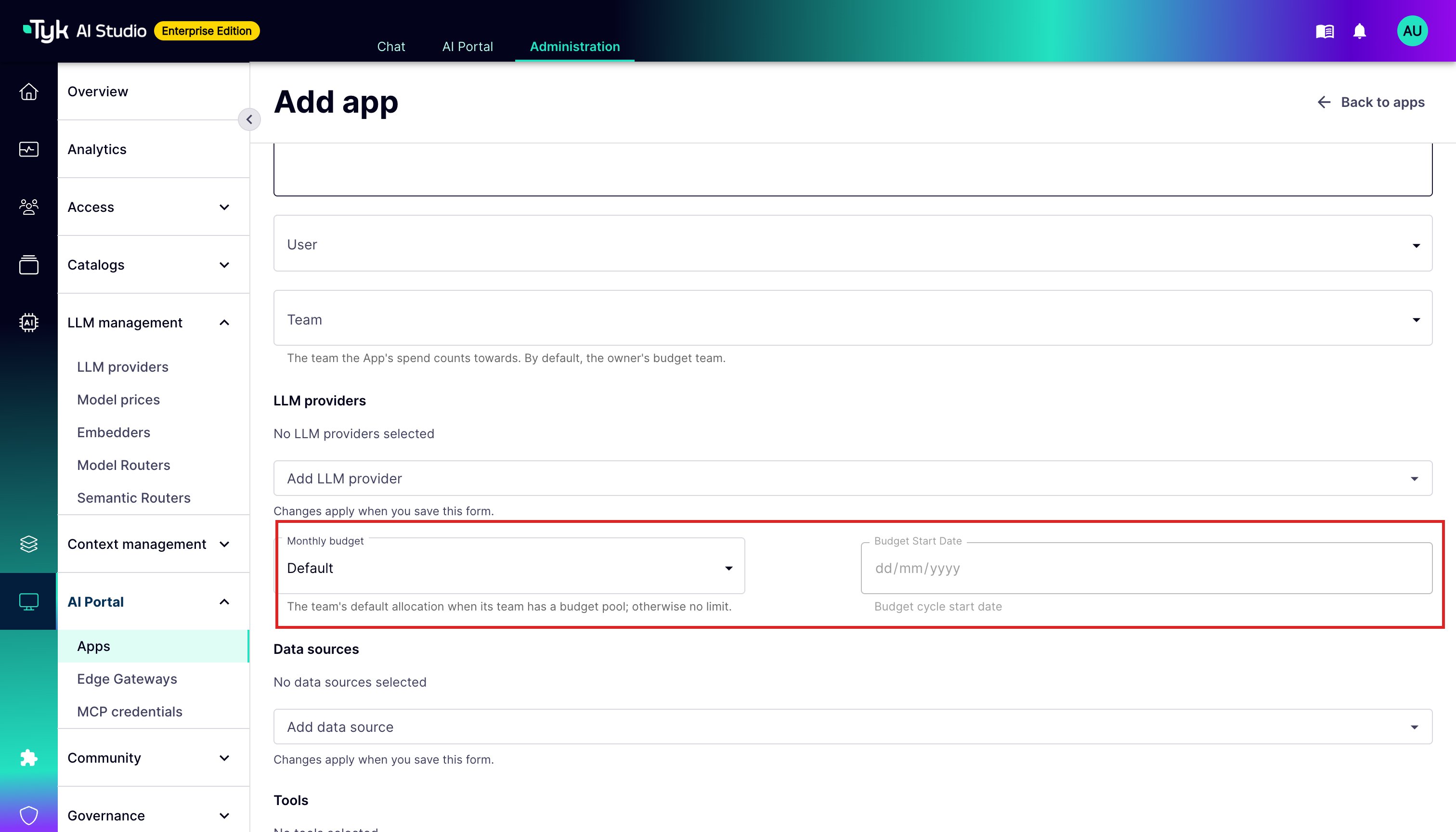
No Limit Versus Zero
A budget can be empty or a number. These two values have different meanings:- No limit (empty, or
nullin the API): AI Studio does not limit spending. - $0: AI Studio blocks all spending. The gateway refuses requests with HTTP 403.
- Any other amount: The gateway refuses requests when the spend in the current period reaches that amount.
DEFAULT_APP_BUDGET). If there is no platform default, the App has no limit.
Enforcement
Note: Budget enforcement (blocking requests when limits are exceeded) is an Enterprise Edition feature. In Community Edition, budgets are tracked and recorded for reporting purposes, but requests are not blocked when limits are exceeded.Budget enforcement primarily occurs at the Proxy & API Gateway: Most deployments serve traffic through Edge Gateways. The embedded gateway in AI Studio applies the same rules. On the embedded gateway, the cost of a request counts against its budgets immediately when AI Studio records the request. The next request is then checked against the new total. AI Studio reads the spend from other AI Studio instances and from Edge Gateways a few seconds after it reaches the database. Only requests that run at the same time can take an App over its budget.
- Request Received: The Proxy receives a request destined for an LLM.
- Cost Estimation: Before forwarding the request, the Proxy might estimate the potential maximum cost (or rely on post-request cost calculation).
- Budget Check: The Proxy checks the current spending against all applicable budgets (e.g., the specific LLM config budget AND the overall organization budget) for the current time period.
- Allow or Deny (Enterprise Edition):
- If the current spending plus the estimated/actual cost of the request does not exceed the limit(s), the request is allowed to proceed.
- If the request would cause a budget limit to be exceeded, the request is blocked with HTTP 403, and an error is returned to the caller.
/ai/... and /v1/...), the error is an OpenAI error object:
Distributed Budget Control (Multi-Gateway)
When running multiple Edge Gateways in a hub-and-spoke architecture, budget tracking faces a split-brain challenge — each gateway only has local visibility into its own spend. Tyk AI Studio solves this with a budget pulse mechanism:- Analytics batching: All Edge Gateways send analytics records (including cost data) back to AI Studio in regular batches. This gives AI Studio a complete view of token spend across the entire estate.
- Budget pulse: AI Studio periodically sends a budget pulse to each gateway containing the total spend for each access token across all gateways.
- Local update: Each gateway updates its local spend counter if Studio’s reported number is higher than what it has locally.
- Blocks: The same pulse lists the Apps that every gateway must refuse, whatever its local numbers are. These are Apps with a budget of $0, and Apps whose Team has spent a blocking Team budget. Gateways keep this list when they restart.
- Alerts: For each pulse, AI Studio finds the Apps whose spend changed at the gateways. It checks these Apps against their App, LLM, and Team budgets. For this reason, the 80% and 100% alerts also occur for gateway traffic.
Note: Budget enforcement (blocking requests at the limit) is an Enterprise Edition feature. In Community Edition, budgets are tracked and visible in dashboards but requests are not blocked.
Team Budgets
Team budgets are an Enterprise Edition feature.
- A ceiling: The maximum that all the Apps of the Team can spend together in a month. When the Team reaches the ceiling, AI Studio can send an alert only, or it can also block the Apps of the Team.
- An allocation pool: When a member of the Team creates an App, the App gets a default allocation from the pool. The allocation cannot be more than the amount that is left. When the pool is empty, the App gets nothing, and the gateway refuses its requests until an administrator gives it an allocation. When you delete an App, its allocation goes back to the pool. The money that the App already spent this month still counts for the Team.
Which Team an App Belongs To
A user can belong to many Teams. For this reason, AI Studio gives each App one Team when the App is created:- The owner’s Budget team, if the user has one and is still a member of it.
- If not, the owner’s first Team that is not the Default Team.
- If not, the Default Team.
Turn On Team Budgets
Team budgets are off by default. To turn them on, an administrator sets the Team budgets switch on the Teams page. When the switch is on:- The Default Team starts with an empty pool (a budget of 0). Apps that go to the Default Team get nothing until you give the Default Team a budget.
- Apps that you created before you set the switch keep their own budgets.
- A Team without a budget does not change.
Team Costs
AI Studio reports the spend of every Team, also Teams without a budget:- The Team Costs table on the dashboard shows the cost, share, tokens, and requests of each Team for the selected date range. It also shows spend that AI Studio cannot connect to a Team.
- The page of each Team shows its budget, spend, allocations, and a breakdown by App for the current period.
- The API endpoint
GET /api/v1/analytics/team-costsreturns the same data, for a maximum range of 366 days.
Alerts for Team Budgets
AI Studio notifies administrators at 80% and 100% of a Team budget. At the same thresholds, it publishesbudget.team.threshold events, and records them in the audit trail. The Team page also shows a warning when the App allocations total more than the Team budget.
Edge Gateways receive the list of Apps that a Team blocks with each budget pulse. For this reason, a Team block gets to the edges in one sync interval (30 seconds by default).
Integration with Other Systems
- Analytics & Monitoring: The Analytics system provides the cost data used to track spending against budgets. The current spent amount for a budget period is derived from aggregated analytics data.
- Model Pricing: The pricing definitions are essential for the Analytics system to calculate costs accurately, which in turn feeds the Budget Control system.
- Notification System: Budgets trigger notifications when spending reaches defined thresholds. AI Studio sends alerts at 80% (warning) and 100% (limit reached) of the budget. It sends each alert one time in each budget period, to the App owner and to administrators.
Benefits
- Financial Control: Prevents unexpected high bills from LLM usage.
- Resource Management: Ensures fair distribution of AI resources according to allocated budgets.
- Accountability: Tracks spending against specific configurations or organizational units.