

Availability
Tyk AI Studio includes a centralized Notification System responsible for generating and delivering alerts and messages to users and administrators based on specific system events.
To send AI Studio events to an external system, such as a SIEM or a Slack channel, use Webhooks.
Purpose
The Notification System aims to:- Inform Stakeholders: Keep users and administrators aware of important events or required actions.
- Enable Proactive Management: Alert administrators to potential issues or thresholds being reached (e.g., budget limits).
- Improve User Experience: Provide timely feedback on asynchronous processes or user-related events.
Key Features
- Event-Driven: Notifications are triggered by specific occurrences within the Tyk AI Studio platform.
- Configurable Channels: Supports multiple delivery methods, primarily:
- In-App Notifications: AI Studio always stores each notification for the user in the app. The notification text is plain text with a link to the related object.
- Email: AI Studio also sends a copy to the user’s email address. This requires SMTP and the user’s email notifications setting.
- User Preferences: Allows users (and potentially administrators) to configure which notifications they wish to receive and via which channels (where applicable).
- Centralized Logic: Provides a single system for managing notification templates and delivery rules.
Common Notification Triggers
Examples of events that might trigger notifications include:- Budget Control:
- 80% of an App, LLM, or Team budget (warning).
- 100% of an App, LLM, or Team budget (limit reached).
- AI Studio sends each alert one time in each budget period. Team budget alerts are an Enterprise Edition feature.
- Apps:
- When an administrator approves the credentials of an App, the developer gets a notification.
- Plugins:
- Plugins can create notifications with the
CreateNotificationRPC, for example when a user requests access to an asset. A plugin notification can contain a link for admins and a link for the AI Portal. - The plugin needs the
notifications.writescope. AI Studio removes raw HTML and unsafe links (for examplejavascript:) from the content. A link must be a path in AI Studio or anhttporhttpsURL. AI Studio drops other links. A plugin can link to an external site, so install only plugins that you trust.
- Plugins can create notifications with the
- User Management:
- New user registration/invitation.
- Password reset request.
- Changes in user roles or team memberships.
- System Health & Errors:
- Significant system errors or failures.
- Service degradation alerts.
- Security Events:
- Suspicious login activity (if monitored).
- Changes to critical security settings.
Configuration
SMTP Configuration (Email Notifications)
To enable email notifications, configure the following environment variables:
Example
.env configuration:
Note: If SMTP is not configured, email notifications will be skipped silently, but in-app notifications will still work.
System-Level Settings (Admin)
Administrators configure core notification settings:- SMTP server details (via environment variables above)
- Default notification templates
- Enabling/disabling specific system-wide notification types
User-Level Settings
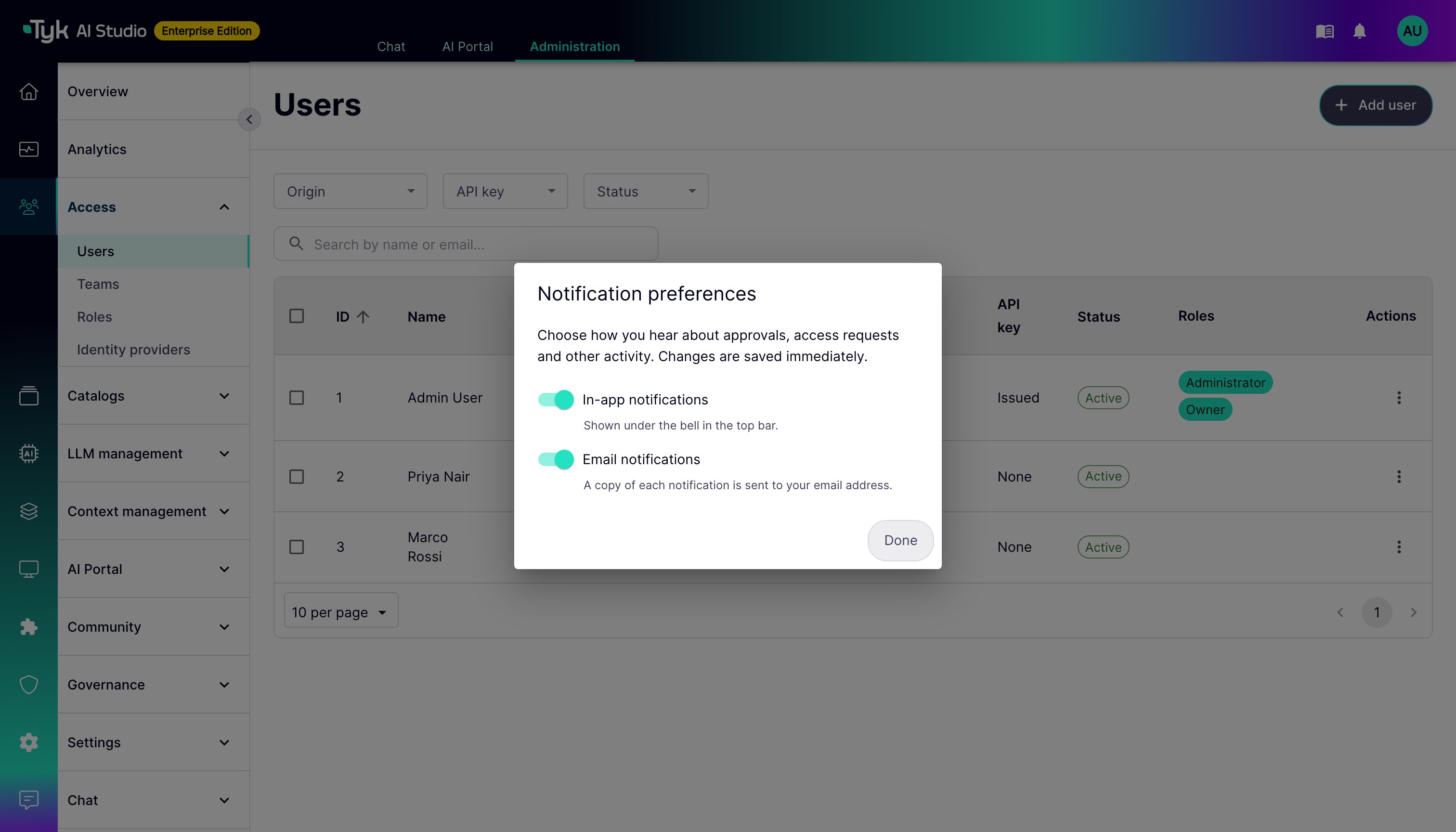
Users manage their notification preferences in the account menu. Click the user avatar in the top bar, then click Notification preferences. There are two switches:- In-app notifications: Show notifications under the bell in the top bar.
-
Email notifications: Send a copy of each notification to the user’s email address.
View Notifications
The bell in the top bar shows the eight most recent notifications. Each notification shows a type icon, a one-line preview, the time, and a dot when it is unread. When you click a notification, AI Studio marks it as read and opens the related page. To mark all notifications as read, click Mark all as read. The notifications page shows all your notifications, grouped by day. You can show only unread notifications, and click Load more to see older ones. AI Studio does not notify a user about an action that the same user did.Integration
The Notification System integrates with various other Tyk AI Studio components that generate relevant events, including:- Budget Control System
- User Management System
- Analytics System (potentially for performance alerts)
- Proxy/Gateway (for error or security event alerts)