

Availability
Tyk AI Studio provides a secure mechanism for storing and managing sensitive information, such as API keys, passwords, authentication tokens, or other credentials required by various platform configurations.
Purpose
The Secrets Management system aims to:- Prevent Exposure: Avoid hardcoding sensitive values directly in configuration files or UI fields.
- Centralize Management: Provide a single place to manage and update credentials.
- Enhance Security: Store sensitive data encrypted at rest.
Core Concepts
- Secret: A named key-value pair where the ‘key’ is the Variable Name used for reference, and the ‘value’ is the actual sensitive data (e.g., an API key string).
-
Encryption:
- Secret values are encrypted at rest within Tyk AI Studio’s storage.
- The encryption and decryption process relies on a key derived from the
TYK_AI_SECRET_KEYenvironment variable set when running the Tyk AI Studio instance. - CRITICAL: The
TYK_AI_SECRET_KEYmust be kept confidential and managed securely. Loss of this key will render existing secrets unusable. Changing the key will require re-entering all secrets. - From v2.2.0, AI Studio encrypts each value with AES-256-GCM. It derives the key from
TYK_AI_SECRET_KEYwith scrypt and a random salt for each value. Encrypted values start withv2:. - On the first start of v2.2.0 or later, AI Studio encrypts existing values again in the background. Values in the old format stay readable during this process. If AI Studio cannot decrypt a value, it skips the value and logs a warning. It does not delete the value.
- If
TYK_AI_SECRET_KEYis not set, AI Studio stores secrets as plain text. It logs aSECURITY WARNINGone time for each process. Always setTYK_AI_SECRET_KEY, also in test deployments that contain real credentials. Webhooks also use this key to encrypt their headers and signing secrets.
-
Reference Syntax: Secrets are referenced within configuration fields (like API key fields in LLM or Tool setups) using a specific syntax:
Replace
VariableNamewith the exact name given to the secret when it was created (e.g.,$SECRET/OPENAI_API_KEY,$SECRET/JIRA_AUTH_TOKEN). -
Runtime Resolution: When a configuration uses a field containing a secret reference (e.g.,
$SECRET/MY_KEY):- The configuration itself stores the
$SECRET/MY_KEYstring, not the actual secret value. - Only when the system needs the actual value at runtime (e.g., the Proxy preparing a request for an LLM, or a Tool calling its external API), Tyk AI Studio retrieves the encrypted secret value, decrypts it using the
TYK_AI_SECRET_KEY, and injects the plain text value into the operation. - The decrypted value is typically used immediately and not persisted further.
- The configuration itself stores the
Creating & Managing Secrets (Admin)
Administrators manage secrets via the Tyk AI Studio UI or API:- Navigate to Settings > Secrets in the admin UI sidebar.
-
Create a new secret by providing:
- Variable Name: A unique identifier (letters, numbers, underscores) used in the
$SECRET/VariableNamereference. - Secret Value: The actual sensitive string (e.g.,
sk-abc123xyz...).
- Variable Name: A unique identifier (letters, numbers, underscores) used in the
-
Save the secret. It is immediately encrypted and stored.
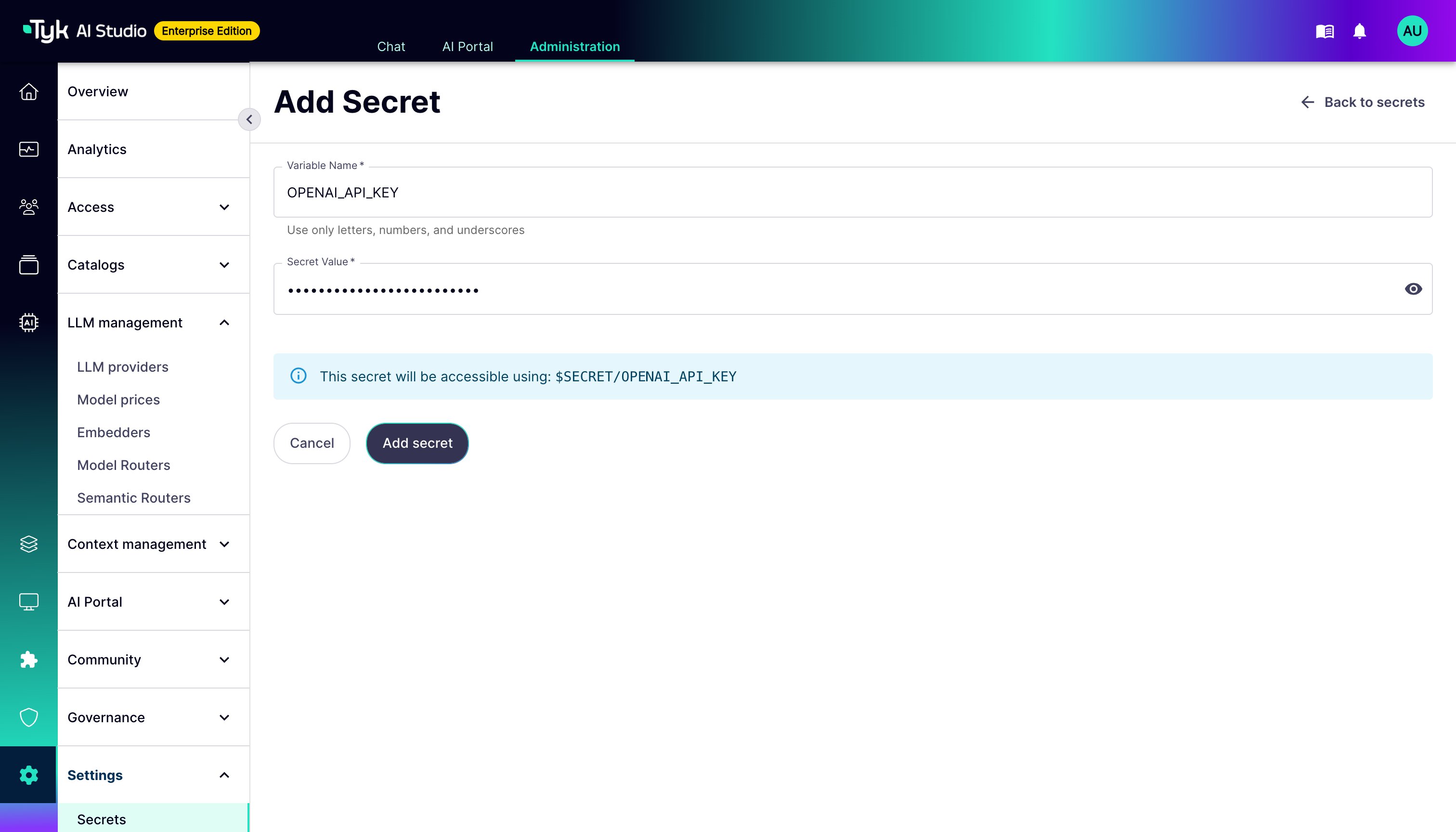
$SECRET/VariableName reference is used, without needing to modify the configurations themselves.
Usage Examples
Secrets are commonly used in:- LLM Configurations: Storing API keys for providers like OpenAI, Anthropic, Google Vertex AI, etc.
- Example: In the API Key field for an OpenAI configuration:
$SECRET/OPENAI_API_KEY
- Example: In the API Key field for an OpenAI configuration:
- Tool Configurations: Storing API keys, authentication tokens (Bearer, Basic Auth), or other credentials needed to interact with the external API the tool represents.
- Example: In a field for a custom header for a JIRA tool:
Authorization: Basic $SECRET/JIRA_BASIC_AUTH_TOKEN
- Example: In a field for a custom header for a JIRA tool:
- Data Source Configurations: Storing API keys or connection credentials for vector databases (e.g., Pinecone, Milvus) or embedding service providers.
- Example: In the API Key field for a Pinecone vector store:
$SECRET/PINECONE_API_KEY
- Example: In the API Key field for a Pinecone vector store:
Security Considerations
- Protect
TYK_AI_SECRET_KEY: This is the master key for secrets. Treat it with the same level of security as database passwords or root credentials. Use environment variable management best practices. - Principle of Least Privilege: Grant administrative access (which includes secrets management) only to trusted users.
- Regular Rotation: Consider policies for regularly rotating sensitive credentials by updating the Secret Value in Tyk AI Studio.