

Availability
Tyk AI Studio’s Data Source system connects the platform to external knowledge bases, primarily vector stores, enabling Retrieval-Augmented Generation (RAG). This allows Large Language Models (LLMs) to access and utilize specific information from your documents, grounding their responses in factual data.
Purpose
The primary goal is to enhance LLM interactions by:- Providing Context: Injecting relevant information retrieved from configured data sources directly into the LLM prompt.
- Improving Accuracy: Reducing hallucinations and grounding LLM responses in specific, verifiable data.
- Accessing Private Knowledge: Allowing LLMs to leverage internal documentation, knowledge bases, or other proprietary information.
Core Concepts
- Data Source: A configuration in Tyk AI Studio that connects to a knowledge base, typically a vector store. It also names the Embedder that populates the store.
- Vector Store Abstraction: Tyk AI Studio provides a unified interface to interact with various vector database types. Supported stores: Pinecone, PGVector, Chroma, Redis, Qdrant, and Weaviate. Administrators configure the connection details for their chosen store.
- Embedder: Text must be converted into numerical vector embeddings before it is stored and searched. From v2.2.0, a data source uses an Embedder for this. An Embedder is a saved embedding configuration that many data sources can share. A linked Embedder uses the connection and credentials of an LLM provider. A standalone Embedder has its own API compatibility, URL, model, and API key. You manage Embedders in LLM management > Embedders. Credentials can use Secrets Management. For more information, refer to Embedders.
-
File Processing: Administrators upload documents (e.g., PDF, TXT, DOCX) to a Data Source configuration. Tyk AI Studio automatically:
- Chunks the documents into smaller, manageable pieces.
- Uses the Embedder of the data source to convert each chunk into a vector embedding.
- Stores the text chunk and its corresponding embedding in the configured Vector Store.
-
RAG (Retrieval-Augmented Generation): The core process where:
- A user’s query in the Chat Interface is embedded using the same Embedder.
- This query embedding is used to search the relevant vector store(s) for the most similar text chunks (based on vector similarity).
- The retrieved text chunks are added as context to the prompt sent to the LLM.
- The LLM uses this context to generate a more informed and relevant response.
- Data Source Catalogues: Similar to Tools, Data Sources are grouped into Catalogues for easier management and assignment to teams.
- Privacy Levels: Each Data Source has a privacy level. It can only be used in RAG if its level is less than or equal to the privacy level of the LLM Configuration being used, ensuring data governance. Privacy levels define how data is protected by controlling LLM access based on its sensitivity. See Privacy Levels for the full score mapping and how the comparison works.
Availability
Data Sources are available on both AI Studio (embedded gateway) and Edge Gateway. Datasource configurations including vector store connection strings, API keys, and embedder credentials are synced to edge gateways via the hub-spoke configuration system with encryption in transit. Datasources support namespace filtering for enterprise multi-tenant deployments. All four proxy endpoints (search, vector search, metadata query, and embedding generation) are functional on edge gateways.How RAG Works in the Chat Interface
When RAG is enabled for a Chat Experience:- User sends a prompt.
- Tyk AI Studio embeds the user’s prompt using the configured embedding service for the relevant Data Source(s).
- Tyk AI Studio searches the configured Vector Store(s) using the prompt embedding to find relevant text chunks.
- The retrieved chunks are formatted and added to the context window of the LLM prompt.
- The combined prompt (original query + retrieved context) is sent to the LLM.
- The LLM generates a response based on both the query and the provided context.
- The response is streamed back to the user.
Creating & Managing Data Sources (Admin)
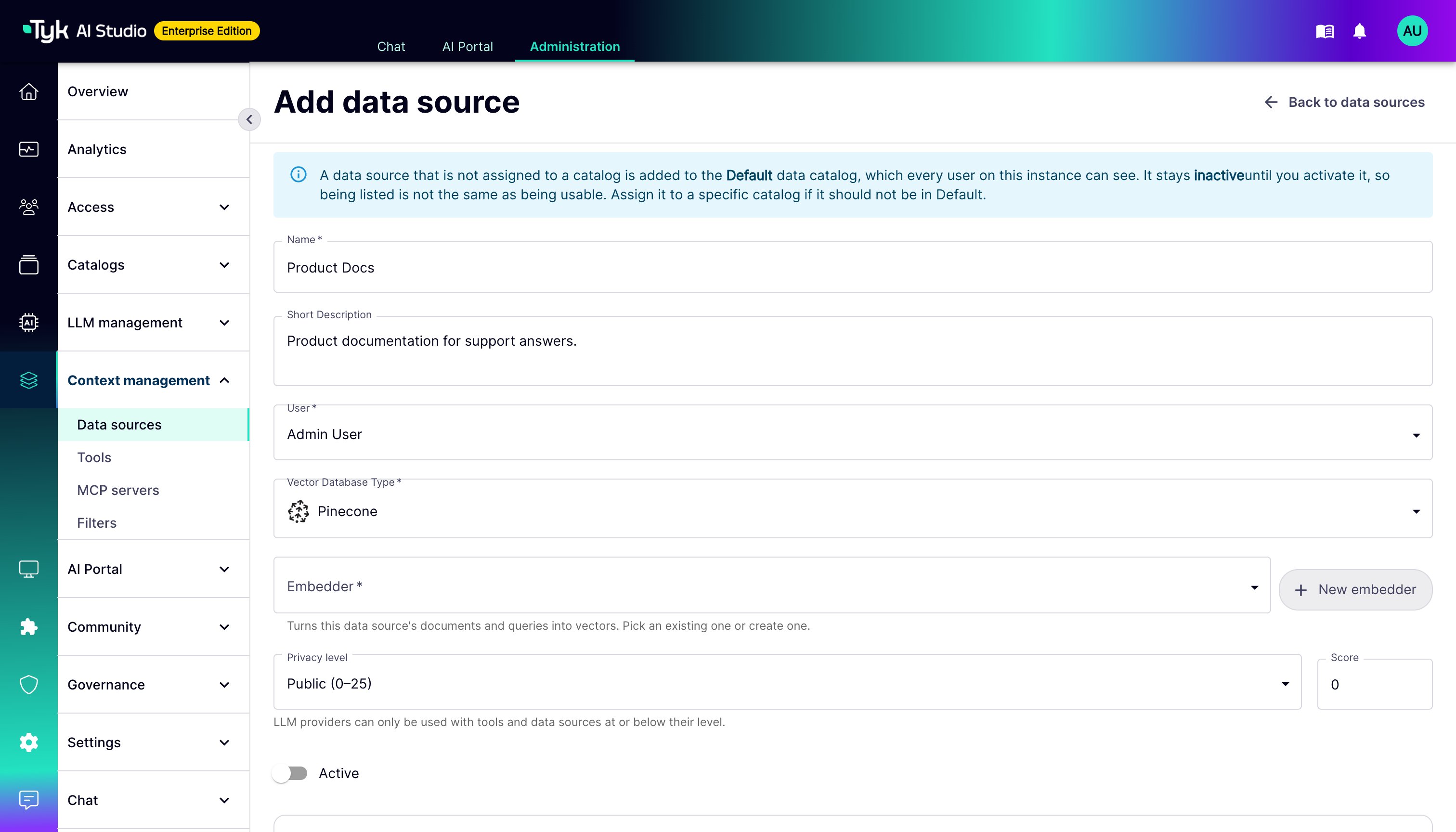
Administrators configure Data Sources via the UI or API:- Define Data Source: Provide a name, description, and privacy level.
-
Configure Vector Store:
- Select the database type (e.g.,
pinecone). - Provide connection details (e.g., endpoint/connection string, namespace/index name).
- Reference a Secret containing the API key/credentials.
- Select the database type (e.g.,
-
Choose an Embedder: In Embedder, select the Embedder that embeds the documents and queries of this data source. To create one from the form, click New embedder.
- The Embedder receives the text. For this reason, its privacy level must be equal to or higher than the privacy level of the data source.
- You cannot change the model of an Embedder while data sources use it. The stored vectors come from that model. To use a different model, create a new Embedder, select it on the data source, and process the embeddings again.
-
Upload Files: Upload documents to be chunked, embedded, and indexed into the vector store.
Embedders in the API
Data source responses containembedder_id. When you create or update a data source, send embedder_id. The earlier fields embed_vendor, embed_url, embed_api_key, and embed_model still work. If you send them, AI Studio links the data source to an Embedder with exactly that configuration, and creates one if necessary. It never changes an Embedder that other data sources share.
When you upgrade to v2.2.0 or later, AI Studio moves the embedding settings of existing data sources into shared Embedders at startup. Data sources with the same settings share one Embedder. No action is necessary.
Authentication Plugins
From v2.2.1, a data source can have an ordered list of authentication plugins. You set the list in the Authentication plugins section of the data source detail page, or withGET and PUT /api/v1/datasources/{id}/auth-plugins. When the list is not empty, only these plugins authenticate requests to the data source on Edge Gateways, and the Edge Gateways refuse App keys. The embedded gateway in AI Studio does not run authentication plugins. For more information, refer to Edge Gateway Plugins.
Organizing & Assigning Data Sources (Admin)
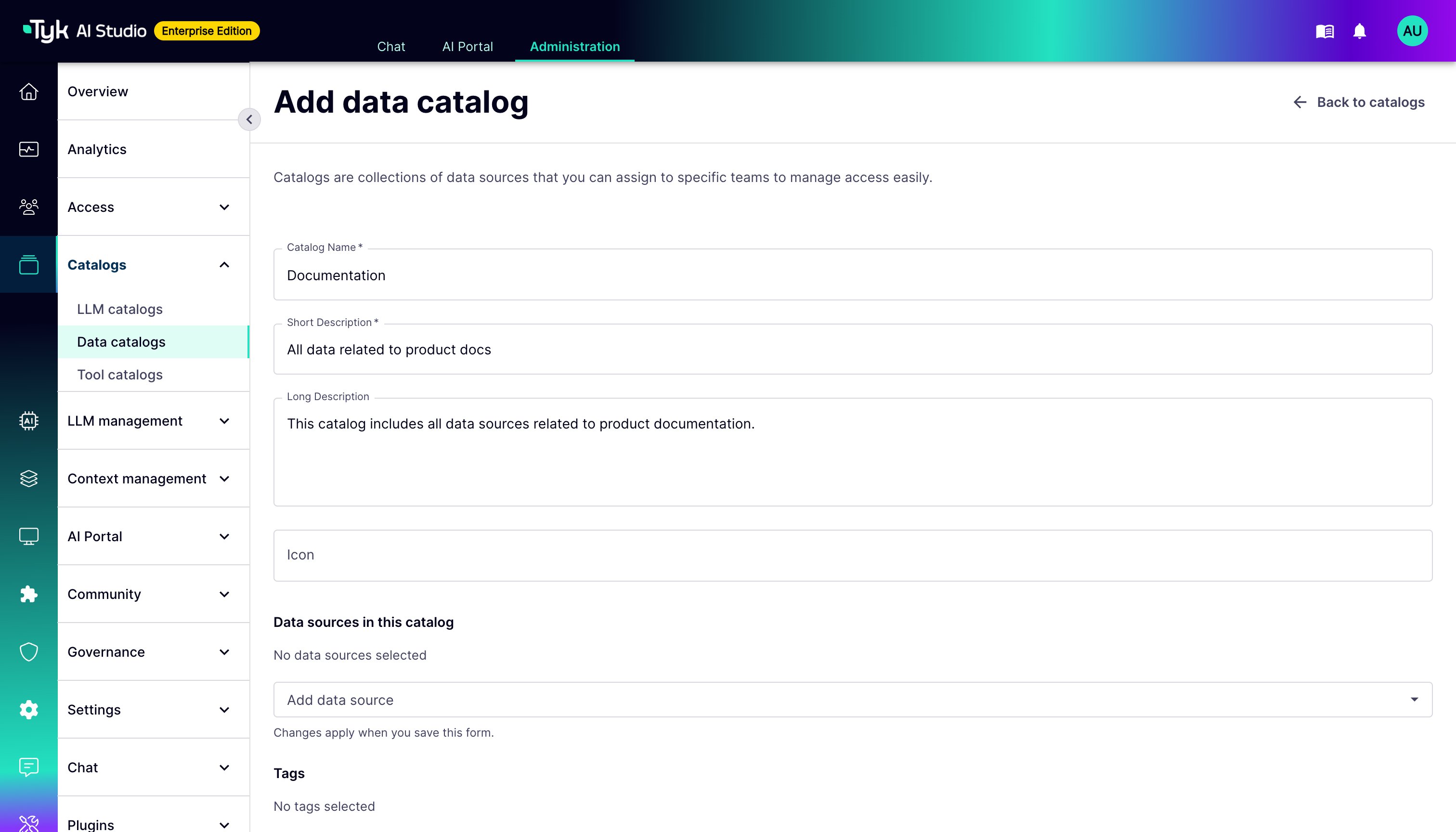
- Create Catalogues: Group related Data Sources into Catalogues (e.g., “Product Docs”, “Support KB”).
-
Assign to Teams: Assign Data Source Catalogues to specific teams.
Using Data Sources (User)
Data Sources are primarily used implicitly via RAG within the Chat Interface. A Data Source will be used for RAG if:- The specific Chat Experience configuration includes the relevant Data Source Catalogue.
- The user belongs to a Team that has been assigned that Data Source Catalogue.
- The Data Source’s privacy level is compatible with the LLM being used.
Programmatic Access via API
Tyk AI Studio provides a direct API endpoint for querying configured Data Sources programmatically:Datasource API Endpoint
- Endpoint:
/datasource/{dsSlug}(where{dsSlug}is the datasource identifier) - Method: POST
- Authentication: Bearer token required in the Authorization header
Request Format
Response Format
Example Usage
cURL
Python
JavaScript
Common Issues and Troubleshooting
-
Trailing Slash Error: The endpoint does not accept a trailing slash. Use
/datasource/{dsSlug}and not/datasource/{dsSlug}/. - Authentication Errors: Ensure your Bearer token is valid and has not expired. The token must have permissions to access the specified datasource.
- 404 Not Found: Verify that the datasource slug is correct and that the datasource exists and is properly configured.
- 403 Forbidden: Check that your user account has been granted access to the datasource catalogue containing this datasource.
-
Empty Results: If you receive an empty documents array, try:
- Reformulating your query to better match the content
- Increasing the value of
nto get more results - Verifying that the datasource has been properly populated with documents